

Complete the kit


Turn the school run and nap time into listening time
- Thousands of audiobooks, podcasts and originals
- Listen on your phone, tablet or Echo — also offline
- Cancel anytime
Key Takeaways
- Snap Circuits dominates this category due to its proprietary snap-on technology, which eliminates the frustration of loose wires and soldering, making it the safest and most intuitive choice for children under 12.
- Project quantity is not a reliable indicator of quality; the SC-750 offers 750 projects but requires significantly more patience and troubleshooting skills than the SC-300, which is better suited for independent play.
- Non-Snap kits like the National Geographic or generic STEM kits often use breadboards or clip-on components, which can lead to connection errors that confuse beginners rather than teaching them circuit logic.
- Age recommendations are often optimistic; kits labeled for ages 8+ are frequently too complex for a typical 8-year-old to complete independently without adult intervention, whereas the SCB-20 is genuinely designed for ages 5-7.
- The longevity of the hobby depends on the kit’s scalability; starting with the SC-100 or SC-200 allows a child to build confidence before moving to the Extreme SC-750, whereas starting with a massive kit can cause immediate disengagement.


| circuit board kit for kid | Projects | Recommended age | Assembly |
|---|---|---|---|
| 12-Piece Electric Circuit Kit | — | 8+ | — |
| National Geographic Circuit Ki | 60+ | 8 years and up | — |
| Snap Circuits Arcade STEM Elec | Over 200 | 8+ | Color-coded snap-together components; no tools or soldering required |
| Snap Circuits 203 Electronics | 200+ | — | — |
| Snap Circuits My Home STEM Ele | 34 | 8+ years | Color-coded, numbered snap-together blocks |
| Science Circuit Kit Electricit | — | — | — |
| Snap Circuits Flight Deck Scie | 5 | — | — |
| Snap Circuits Classic SC-300 S | 318 | 8 years and up | Snap-together; no soldering or tools required |
| Snap Circuits STEM FM Radio Ki | — | — | Color-coded, numbered blocks snap onto a clear plastic base |
| Science Kits for Kids | 420+ | — | — |
| Snap Circuits Explorer SC-100 | — | — | Color-coded snap-together parts |
| Science STEM Kits for Kids | — | 3–12 | Color-coded parts |
| Snap Circuits Beginner SCB-20 | More than 20 | 5–9 years | — |
| Elenco Snap Circuits Extreme S | — | — | Snap-together; no soldering or tools required |
More Details on Our Top Picks
12-Piece Electric Circuit Kit for Kids Age 8-12
The 12-Piece Electric Circuit Kit is the practical pick when several children need a basic circuit activity at once. Its set of 12 kits, each with bulbs, switches, and battery holders, suits classroom stations or siblings better than a single-project-focused kit such as Snap Circuits My Home. The simpler component mix keeps the activity centered on assembling and understanding basic circuits rather than exploring a large project library. That can help beginners focus, but it also limits variety: it does not advertise the themed projects or extensive project count offered by the National Geographic Circuit Kit. Children need two AA batteries per activity, and those are not included. I’d choose it for guided practice and repeatable introductory lessons, not for a child seeking lots of different builds.
Pros:- Includes 12 circuit kits, making it suitable for group activities
- Bulbs, switches, and battery holders provide direct practice with basic circuit parts
- Designed for ages 8 and up and described as beginner-friendly
- Can be used for classroom or home projects
Cons:- The basic component selection offers less project variety than the National Geographic Circuit Kit
- Requires two AA batteries, which are not included
- Adult supervision may be needed for younger children
Best for: Teachers, after-school leaders, or families who want multiple children to assemble basic bulb-and-switch circuits at the same time
Not ideal for: A child wanting a large variety of themed projects or advanced electronic effects; the listed components focus on basic circuits
- Included kits:12 circuit kits
- Components:Light bulbs, switches, and battery holders
- Power source:2 AA batteries (not included)
- Recommended age:8+
- Model number:DP502
- Manufacturer:GadgetGlee
Our verdict“Choose this kit for group-friendly practice with basic circuits, but pick a project-rich alternative if variety is the priority.”
National Geographic Circuit Kit for Kids, 60+ Projects
For children who stay engaged by changing challenges, the National Geographic Circuit Kit offers a wider project menu than the basic 12-Piece Electric Circuit Kit. Its 60-plus builds include a fiber optic light show, a levitating ball, and a flying copter, giving learners visible outcomes alongside circuit practice. Snap-together parts need no tools, while illustrated instructions and video guides provide more support than the primarily basic activity approach described for the 12-piece set. The tradeoff is that this is a plastic, single-kit experience rather than a 12-kit option for running a group activity. Video help also depends on QR-code access, which may be inconvenient where screens or internet access are limited. I’d favor it for one child ready to sample many different builds, rather than a class needing parallel kits.
Pros:- More than 60 projects offer a range of build challenges
- Snap-together components require no tools
- Illustrated instructions and video guides support independent building
- Includes distinctive projects such as a fiber optic light show and flying copter
Cons:- Video instructions require QR-code access
- Designed for ages 8 and up, so it may not suit younger learners
- Unlike the 12-Piece Electric Circuit Kit, it is not described as a multi-kit classroom set
Best for: Families seeking a varied, visually engaging introduction to circuits for one child aged 8 or older
Not ideal for: Teachers needing multiple simultaneous kits or households that cannot access QR-linked video instructions
- Brand:Blue Marble
- Set name:Circuit Maker
- Recommended age:8 years and up
- Projects:60+
- Included components:Multiple components for electrical experiments
- Material:Plastic
- Dimensions:11 x 3 x 12 inches
- Weight:2 pounds
- Model number:NGCIRCUIT60
Our verdict“Pick this for a child who values a broad menu of showy builds and can use the linked video guidance.”
Snap Circuits Arcade STEM Electronics Kit for Kids Ages 8+
The Snap Circuits Arcade is the most game-oriented option here: it combines arcade-style projects with sounds, lights, a preprogrammed microcontroller, a programmable word fan, a tri-color light orb, and a dual-LED display. That gives it a more playful direction than the circuit fundamentals emphasized by the Snap Circuits 203 Electronics Discovery Kit, which covers topics such as conductivity and resistors. Both use snap-together parts and illustrated guidance, but Arcade’s themed effects may be a stronger hook for kids drawn to interactive builds. Its project count is listed as over 200, though the component count is inconsistent in the supplied description (36 pieces in one place and 30 components in another). Three AA batteries are also sold separately, and the number of parts is less clear than on the 203 kit.
Pros:- Arcade-style builds add game-oriented appeal
- Includes a preprogrammed microcontroller, programmable word fan, light orb, and LED display
- Color-coded snap-together parts require no tools or soldering
- Offers more than 200 projects
Cons:- The description lists both 36 pieces and 30 components
- Requires three AA batteries, which are not included
- Its arcade focus may be less suitable than the Snap Circuits 203 kit for learners prioritizing circuit concepts
Best for: Children aged 8 or older who are motivated by game-like projects, lights, and electronic effects
Not ideal for: Buyers who want a clearly stated component count or prefer a kit centered on foundational circuit concepts
- Brand:Snap Circuits
- Set name:Arcade
- Recommended age:8+
- Projects:Over 200
- Component count:Description lists 36-piece kit and 30 components
- Power:3 AA batteries (not included)
- Assembly:Color-coded snap-together components; no tools or soldering required
- Included components:Assembly parts, plastic grid, and instruction book
Our verdict“Choose Arcade for a child drawn to interactive game-style builds, provided the inconsistent component count is acceptable.”
Snap Circuits 203 Electronics Discovery Kit, 200+ Projects, Ages 8+
The Snap Circuits 203 Electronics Discovery Kit earns its place for learners who want a broad set of builds tied to core electronics ideas. Its 200-plus projects introduce basic circuits, conductivity, and series and parallel resistors, so the manual can support more than trial-and-error assembly. Compared with Snap Circuits Arcade, this kit is less focused on game-like effects and more directly framed around learning circuit concepts; Arcade may be the better hook for a child who prefers lights and interactive themes. The 203 includes 42 snap circuit parts and a full-color manual, with color-coded, numbered modules intended to make assembly straightforward. Its main practical drawback is the separate need for three AA batteries. It is also a single-kit choice, unlike the 12-Piece Electric Circuit Kit’s group-oriented format.
Pros:- More than 200 projects provide a substantial range of activities
- Manual introduces conductivity and series and parallel resistors
- Color-coded, numbered snap parts support easier assembly
- No extra tools are required
Cons:- Three AA batteries are required and not included
- Less explicitly game-focused than Snap Circuits Arcade
- A single kit is less suited to group use than the 12-Piece Electric Circuit Kit
Best for: Families seeking a substantial, instruction-led circuit kit for an 8+ learner interested in how circuits work
Not ideal for: Children primarily seeking arcade-style effects, or educators who need several kits for simultaneous group work
- Brand:Snap Circuits
- Model:CM-200
- Age range:8 years and up
- Projects:200+
- Included parts:42 snap circuit parts
- Manual:Full-color project manual
- Batteries:3 AA batteries required, not included
- Tools required:None
Our verdict“Pick the 203 for guided variety and circuit concepts, rather than arcade-style builds or a classroom set of multiple kits.”
Snap Circuits My Home STEM Electronics Building Kit for Kids Ages 8+
The Snap Circuits My Home gives circuit building a relatable theme: children can explore how electricity serves household functions, from lighting to infrared-controlled systems. Its 34 projects and 60 parts include switches, wires, LEDs, a motor, a meter, and other components, creating a more home-centered learning path than the general project range of the Snap Circuits 203 Electronics Discovery Kit. That focus can help connect circuit parts to familiar uses, while the 203 is the clearer choice for a wider set of builds tied to named fundamentals such as conductivity and resistors. My Home’s color-coded, numbered blocks snap together without tools, but the project count is more limited than the 200-plus offerings in the 203 and Arcade kits. It also requires three AA alkaline batteries, sold separately.
Pros:- Home-focused projects connect circuits to familiar electrical functions
- Includes 34 projects and 60 parts
- Parts include switches, LEDs, a motor, and a meter
- Color-coded snap-together blocks need no glue or tools
Cons:- Its 34 projects are fewer than the 200-plus offered by Snap Circuits 203 and Arcade
- Requires three AA alkaline batteries, sold separately
- The home theme may be less appealing to children who prefer games or a broader project mix
Best for: Children aged 8 or older who want to connect circuit building with household lighting, switches, and controlled systems
Not ideal for: Buyers seeking a large project library or a kit that does not require separately supplied batteries
- Brand:Snap Circuits
- Recommended age:8+ years
- Projects:34
- Parts:60 parts
- Included parts:Base grid, switches, wires, battery holder, resistors, capacitor, LEDs, lamp, sound module, transistors, meter, motor, and more
- Assembly:Color-coded, numbered snap-together blocks
- Tools or glue:Not required
- Batteries:3 AA alkaline batteries, sold separately
Our verdict“Choose My Home for a themed introduction to household circuits, not for the broadest project library.”
Science Circuit Kit Electricity for Kids, STEM Electrical Light Bulb Experiment, Fruit Energy Circuits, Engineering Projects
I’d choose this kit for children who want to see electricity concepts connected to familiar materials, not just assemble snap-together circuits. Its eight guided experiments cover series and parallel circuits alongside saltwater power and fruit batteries, giving it a more exploratory focus than the Snap Circuits Classic SC-300, which offers far more projects but centers on reusable electronic components. The included circuit book helps children aged 8–12 follow each activity and build understanding step by step. That narrower experiment list is also the tradeoff: it won’t match the Classic’s breadth for repeated project-building. AA batteries are not included, and some activities may call for adult help, so this is better for a supported learning session than fully independent play.
Pros:- Eight activities introduce several circuit and electricity concepts
- Includes a detailed book to guide experiments
- Fruit and saltwater activities connect electricity to everyday materials
- Designed for home or classroom learning
Cons:- Only eight experiments, fewer than the Snap Circuits Classic SC-300’s project library
- AA batteries are not included
- Some experiments may need adult supervision
Best for: Families or teachers seeking a guided introduction to circuit concepts and hands-on experiments with fruit or saltwater.
Not ideal for: Children who want a large library of reusable snap-together builds or expect to complete every activity without adult support.
- Experiments:8
- Age range:8+
- Battery requirement:AA batteries, not included
- Topics:Series and parallel circuits, saltwater power, and fruit batteries
- Guide:Detailed circuit book
- Model:DP501
- Manufacturer:GadgetGlee
Our verdict“Choose this for guided, real-world electricity experiments; pick the Snap Circuits Classic SC-300 if project variety matters more.”
Snap Circuits Flight Deck Science/STEM Toy Kit | Ages 8+ | Construction Gift for Boys and Girls
The Flight Deck suits children who learn best when a circuit activity has a physical outcome. Its five projects mix electricity with air pressure and physics, including paper-airplane launching and pattern-making, so it feels more like a small activity set than a broad electronics course. Compared with the Snap Circuits Classic SC-300, it offers far fewer builds, but its themed activities can make the science feel more immediate and playful. The emphasis on independent play is useful for children aged 8 and up, though younger users may still need supervision. The limited project count is the main compromise: buyers looking for a kit that supports many sessions of progressively varied circuit construction should look at the Classic instead. Batteries are not included, adding a small bit of setup before play.
Pros:- Combines electricity activities with air pressure and physics
- Paper-airplane launching gives circuit learning a physical result
- Designed to support independent play for ages 8 and up
- Includes several distinct activity types in a themed kit
Cons:- Five projects provide less long-term variety than the Snap Circuits Classic SC-300
- Batteries are not included
- Younger children may need adult supervision
Best for: Families looking for a compact, themed STEM activity that combines simple circuits with movement and creative play.
Not ideal for: Children seeking a large collection of electronics builds or a kit focused mainly on learning circuit components in depth.
- Age range:8+
- Projects:5
- Activities:Paper-airplane launching and pattern-making
- Concepts:Electricity, air pressure, and physics
- Components:Necessary components included
- Batteries:Not included
- Awards listed:Specialty Toy of the Year, Seriously STEM!, Good Housekeeping’s Best Toys, and Purdue University’s Engineering Gift
Our verdict“Pick Flight Deck for a short, active STEM experience; choose the Snap Circuits Classic SC-300 for sustained circuit-building variety.”
Snap Circuits Classic SC-300 STEM Electronics Kit, 300+ Projects, Ages 8+
I’d make the Snap Circuits Classic SC-300 my broadest recommendation for kids ready to explore electronics over many sessions. Its 318 guided projects use numbered, color-coded parts that snap onto a grid, letting children move from simpler builds toward radios, alarms, and doorbells without soldering or tools. That breadth sets it apart from the Snap Circuits STEM FM Radio Kit, which focuses on one working device, and from the Science Circuit Kit’s eight concept-led experiments. The Classic makes more sense when a child wants to keep building and changing circuits rather than complete a short sequence. The tradeoff is the need to store and sort 61 pieces, plus a requirement for four AA batteries, sold separately. Its age recommendation also starts at eight, so it is not aimed at younger beginners.
Pros:- 318 projects provide substantial guided building variety
- Numbered, color-coded parts make component selection easier
- Snap-together assembly needs no soldering or tools
- Projects progress from simpler circuits to devices such as radios and alarms
Cons:- Requires four AA batteries, not included
- The 61-part set needs sorting and storage
- Its broad project format may be more than a child seeking one specific build needs
Best for: Families seeking a reusable, progressively challenging circuit kit for an electronics-curious child aged eight or older.
Not ideal for: Buyers who want one focused project, a small parts set, or a kit for children younger than eight.
- Model:SC-300
- Projects:318
- Parts:61
- Recommended age:8 years and up
- Power:Four AA batteries, not included
- Assembly:Snap-together; no soldering or tools required
- Included components:Plastic snap-grid, 61 electrical parts, instruction and project guides
Our verdict“Choose the SC-300 for the widest range of guided circuit builds, and choose the FM Radio Kit if a single working radio is the main goal.”
Snap Circuits STEM FM Radio Kit for Ages 8+
This kit is the focused choice for a child who wants a practical end point: a working FM radio assembled from color-coded, numbered blocks. Children can scan stations up to 108 MHz and adjust the volume, making the result easier to connect with everyday electronics than the more open-ended projects in the Snap Circuits Classic SC-300. The Classic is the stronger pick for repeated exploration, with 318 projects; this one trades that breadth for a clear, memorable build. Its smaller scope may suit a child who prefers a specific goal, but it can feel limited once the radio is assembled. It also needs three AA batteries, which are not included, and the FM module must be reset to scan again after reaching 108 MHz.
Pros:- Builds a working FM radio with station scanning and adjustable volume
- Color-coded, numbered blocks support straightforward assembly
- Connects basic circuit learning to a familiar device
- Clear project goal can suit children who prefer a defined build
Cons:- Much narrower project range than the Snap Circuits Classic SC-300
- Requires three AA batteries, not included
- FM module must be reset to scan again after reaching 108 MHz
Best for: Children aged eight or older who want to assemble and use one recognizable electronic device while learning basic circuitry.
Not ideal for: Kids who want many different circuit challenges or a kit that keeps introducing new projects after the first build.
- Model:SCP12
- Age range:8 years and up
- FM tuning range:Up to 108 MHz
- Power:Three AA batteries, not included
- Included components:12
- Assembly:Color-coded, numbered blocks snap onto a clear plastic base
- Warranty:No warranty
Our verdict“Choose this when the goal is a working radio; choose the Snap Circuits Classic SC-300 for a wider range of builds.”
Science Kits for Kids – STEM Electronics Exploration Kit with 420+ Projects and 35 Circuit Parts
With a stated age range of 3–12 years and more than 420 project ideas, this kit is aimed at families who want one electronics set to support different stages of childhood. Its 35 circuit parts, colorful manual, and activity cards provide assembly guidance, while the no-soldering format lowers the barrier for children learning to connect components. Compared with the Snap Circuits Classic SC-300, which lists 318 projects and is recommended from age eight, this kit claims a wider age span and more project ideas, but it has fewer parts. That makes the printed project count less useful as a measure of hands-on variety on its own. Very young children may need help with more complex builds, and AA batteries are not included. I’d choose it for shared family use, not as an unsupervised preschool activity.
Pros:- Lists more than 420 project ideas
- Includes a 37-page manual and four indicator cards
- No-soldering assembly supports hands-on circuit building
- Stated age span may suit families sharing the kit across age groups
Cons:- 35 parts are fewer than the Snap Circuits Classic SC-300’s 61 parts
- Some activities may be too complex for younger children without adult help
- AA batteries are not included
Best for: Families with children at different ages who want a guided electronics kit that can be used with adult support as skills grow.
Not ideal for: Buyers seeking a clearly age-targeted beginner set for independent use by a very young child, or a kit with a larger component inventory.
- Projects:420+
- Circuit parts:35
- Age range:3–12 years
- Manual:37 pages
- Indicator cards:4
- Battery requirement:AA batteries, not included
- Model:RC1007
Our verdict“Choose this for a family seeking guided projects across several ages, but favor the Snap Circuits Classic SC-300 for a larger component set and a clearer age focus.”
Snap Circuits Explorer SC-100 STEM Electronics Kit – 100+ Projects, Ages 8+
The SC-100 offers a useful middle ground: its 28 color-coded parts keep assembly approachable, while 100+ projects give curious kids more to try than the SCB-20’s smaller starter set. Illustrated instructions for projects such as an alarm and musical doorbell turn the snap-together layout into practical experiments, with no soldering or tools needed. I’d choose it for an eight-and-up beginner who is ready to move beyond a handful of introductory builds but doesn’t need the SC-750’s larger, more advanced collection. The tradeoff is that the project count depends on reusing the same components, and batteries are not included. Small pieces can also frustrate younger children, so the broad project range doesn’t make this a suitable pick for every age.
Pros:- Color-coded, numbered pieces snap onto a plastic grid without soldering or tools.
- More than 100 project ideas provide a wider starting range than the SCB-20.
- Illustrated instructions guide kids through builds such as an alarm and musical doorbell.
- Compatible with other Snap Circuits kits for expanding a collection.
Cons:- Batteries are required but not included.
- Small components may be difficult for younger children to handle.
- The project count relies on recombining the same 28 components.
Best for: Families with children ages 8 and up who want a tool-free introduction with enough projects to revisit over time.
Not ideal for: Children under 8 or families seeking larger, easy-to-grip parts; small components may be difficult to handle.
- Components:28
- Projects included:100+
- Age range:8+
- Assembly:Color-coded snap-together parts
- Tools or soldering:Not required
- Instruction guide:Illustrated project book
- Expansion:Compatible with other Snap Circuits kits
- Batteries:Required; not included
Our verdict“Choose the SC-100 for an eight-and-up beginner who wants more project variety than the SCB-20 without stepping up to the larger SC-750.”
Science STEM Kits for Kids, Electronics Exploration Kit, 66 Pcs DIY Circuit Parts, 1200+ Projects, Educational Toy for Ages 3-12
This kit’s main appeal is its stated 1,200+ project ideas paired with 66 pieces, a bigger listed parts count than the SC-100’s 28. Color-coded assembly and the no-tools setup lower the barrier to trying builds, while the extensive menu may suit families who want lots of prompts for continued exploration. That project total is a claim about possible builds, not a sign that every activity introduces a distinct concept; the description gives less detail about specific experiments and guidance than the SC-100’s illustrated examples. The broad suggested age range of 3–12 also needs careful interpretation: the product information says it may be too advanced for children under 5. I’d favor this over the SCB-20 for a household seeking many project prompts, but skip it if you want a clearly defined starter path for a very young child.
Pros:- Lists 66 pieces, more than the SC-100’s 28 components.
- Offers over 1,200 stated project ideas for extended building.
- Color-coded parts are designed for easy assembly.
- Requires no tools or soldering.
Cons:- The stated age range of 3–12 conflicts with the warning that it may be too advanced for children under 5.
- Product details provide limited information about specific projects and instructional materials.
- The kit focuses on electronics rather than covering a wider range of STEM activities.
Best for: Families with school-age children who want a large selection of electronics project ideas and tool-free assembly.
Not ideal for: Caregivers shopping for children under 5 or buyers who want detailed, named projects and a clearly described beginner manual.
- Pieces:66
- Projects included:Over 1,200
- Recommended age:3–12
- Tools required:None
- Assembly:Color-coded parts
- Activity focus:Electronics projects
Our verdict“Pick this kit for school-age kids who value a large menu of electronics builds, but choose the SCB-20 for a more clearly defined young-beginner introduction.”
Snap Circuits Beginner SCB-20 STEM Electronics Kit for Kids Ages 5–9
The SCB-20 is the clearest choice here for a child just starting out: its 14 parts and more than 20 projects make the learning path less sprawling than the SC-100’s 100+ activities or the SC-750’s extensive project range. An illustrated beginner manual introduces switches and circuits in an age-appropriate format, while the lighted, color-changing fan gives children a visible result from their builds. That smaller scope is also its main limitation. Kids who quickly master the basics may want more variety, and its 5–9 age range is narrower than the SC-100’s 8+ audience. The kit needs three AA batteries that are not included, so plan for that before opening it. I’d pick this over the larger kits when simple, guided first steps matter more than long-term project breadth.
Pros:- Fourteen parts and more than 20 projects keep the entry point manageable.
- Illustrated beginner manual uses age-appropriate diagrams and language.
- Lighted, color-changing fan gives kids a visible response to their circuits.
- Snap-together components introduce switches and circuit concepts without soldering.
Cons:- Three AA batteries are required and not included.
- Its smaller parts and project range offer less room to progress than the SC-100 or SC-750.
- The recommended age range of 5–9 may not suit older children looking for more challenging builds.
Best for: Caregivers introducing children ages 5–9 to basic circuits through short, illustrated, hands-on projects.
Not ideal for: Older children seeking a large project library or families who want a kit ready to use without supplying batteries.
- Brand:Snap Circuits
- Model:SCB-20
- Recommended age:5–9 years
- Number of parts:14
- Projects:More than 20
- Batteries required:3 AA batteries
- Batteries included:No
- Included components:Base board, circuit modules, illustrated beginner manual
Our verdict“Choose the SCB-20 for a child ages 5–9 who needs a compact, guided first step rather than a large project collection.”
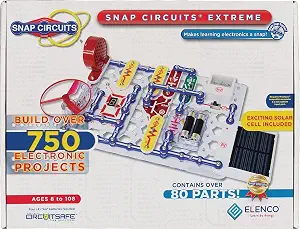
Elenco Snap Circuits Extreme SC-750
With 80+ parts, more than 750 projects, and a computer interface for viewing waveforms and frequencies, the SC-750 is the most technically ambitious option in this group. It goes well beyond the SC-100’s introductory project range and the SCB-20’s first-step focus, giving older children more components and concepts to explore. The interface can make otherwise abstract signals easier to see, but its stated Windows 95-or-later compatibility may be a stumbling block for families using newer systems; check software support before choosing it for that feature. Four AA batteries are also required and not included. The large project menu and more advanced components can overwhelm younger learners, so I’d reserve this for a child already keen on electronics rather than use it as a first circuit board kit.
Pros:- More than 80 parts and 750+ projects offer substantially more scope than the SC-100.
- Computer interface supports waveform and frequency viewing.
- Includes components such as a photo resistor, solar cell, analog meter, and power amplifier.
- Snap-together construction requires no soldering or tools.
Cons:- Requires four AA batteries, which are not included.
- Computer interface compatibility is listed as Windows 95 or later and may not suit some current setups.
- Complex projects and the broad component set may challenge younger or first-time builders.
Best for: Electronics-motivated children ages 8 and up who want many builds and are interested in viewing waveforms and frequencies.
Not ideal for: Young beginners or families relying on the computer interface with a modern computer without first confirming software compatibility.
- Number of parts:80+
- Number of projects:750+
- Computer interface:Included for viewing waveforms and frequencies
- Included components:Photo resistor, power amplifier, variable capacitor, analog meter, solar cell
- Manuals:Included
- Compatibility:Windows 95 or later
- Batteries required:4 AA batteries
- Batteries included:No
- Assembly:Snap-together; no soldering or tools required
Our verdict“Choose the SC-750 for an older, electronics-curious child who can make use of its advanced parts and interface, not for a first-time beginner.”

How We Picked
I evaluated these fourteen kits based on three primary criteria: safety and ease of assembly, educational progression, and component durability. Safety was the first filter; any kit requiring soldering or exposing exposed high-voltage components was excluded, as this roundup focuses on age-appropriate electronics for children. I then assessed how well each kit teaches fundamental concepts like series and parallel circuits, rather than just providing a ‘follow the dots’ experience. Kits that allow for open-ended experimentation scored higher than those restricted to rigid, step-by-step instructions. Durability was another critical factor, as children are rough with small plastic components. I prioritized kits with robust snapping mechanisms or high-quality breadboards that resist breaking after repeated use. Finally, I considered the ‘frustration factor.’ A kit that requires constant adult intervention to fix connection errors fails as an educational tool for independent play. The ranking reflects a balance between immediate fun and long-term skill development, favoring systems that grow with the child.| circuit board kit for kid | Assembly |
|---|---|
| 12-Piece Electric Circuit Kit | — |
| National Geographic Circuit Ki | — |
| Snap Circuits Arcade STEM Elec | Color-coded snap-together components; no tools or soldering required |
| Snap Circuits 203 Electronics | — |
| Snap Circuits My Home STEM Ele | Color-coded, numbered snap-together blocks |
| Science Circuit Kit Electricit | — |
| Snap Circuits Flight Deck Scie | — |
| Snap Circuits Classic SC-300 S | Snap-together; no soldering or tools required |
| Snap Circuits STEM FM Radio Ki | Color-coded, numbered blocks snap onto a clear plastic base |
| Science Kits for Kids | — |
| Snap Circuits Explorer SC-100 | Color-coded snap-together parts |
| Science STEM Kits for Kids | Color-coded parts |
| Snap Circuits Beginner SCB-20 | — |
| Elenco Snap Circuits Extreme S | Snap-together; no soldering or tools required |
Factors to Consider When Choosing Circuit Board Kit For Kids
Selecting a circuit kit is not just about picking the box with the most pictures. You need to match the kit’s complexity to your child’s fine motor skills and attention span. Here are the key factors to weigh before purchasing.Assembly Method: Snap-On vs. Breadboard vs. Clip-On
The method of connection defines the user experience. Snap-on systems (like Snap Circuits) use color-coded, keyed components that only fit in the correct orientation, drastically reducing errors. Breadboards require inserting bare wire ends or component legs into holes, which demands fine motor precision and can be frustrating for younger hands. Clip-on systems fall in the middle but often suffer from loose connections that cause intermittent failures. For kids under 10, snap-on is generally the only way to maintain engagement. Older children (10+) may benefit from breadboards as they prepare for real-world prototyping, but the learning curve is steeper.
Project Scalability and Longevity
A common mistake is buying a massive kit for a beginner. If a child cannot complete the first five projects, they will abandon the kit entirely. Look for kits that start with simple light-up exercises and gradually introduce integrated circuits, timers, and amplifiers. The SC-300 and SC-750 are praised because they include a ‘progressive learning’ manual structure. Conversely, generic kits with 1000+ projects often lack this pedagogical structure, leaving parents to figure out the sequence. Ensure the manual clearly distinguishes between ‘learn’ projects and ‘explore’ projects.
Component Quality and Reusability
Plastic components in cheaper kits often crack at the snap points after 20-30 uses. High-quality kits use reinforced ABS plastic and gold-plated contacts (or equivalent corrosion-resistant materials) to maintain conductivity over years. If you plan for the kit to be a long-term hobby, inspect the part list for the number of ICs (integrated circuits). Kits with more unique ICs (like the SC-750) offer more creative possibilities than kits that rely on repeating the same three components in different configurations. Check if the manufacturer sells replacement parts, as small components like transistors are easy to lose.
Power Source and Safety Standards
All recommended kits here use standard AA or AAA batteries, which is the safest option for children. Avoid any kit that suggests using wall adapters without a verified UL-rated power supply. Some kits include a ‘short circuit’ warning feature, which is vital for teaching kids not to connect the positive and negative terminals directly. This safety feature prevents the board from overheating or damaging the components. Always verify that the kit complies with current ASTM F963 toy safety standards, especially if small parts are involved, to mitigate choking hazards for younger siblings.
Educational Support and Parental Involvement
Consider how much time you are willing to spend troubleshooting. Some kits, like the National Geographic or generic STEM options, rely on external apps or QR codes for instructions, which can be a distraction. Printed, step-by-step booklets with clear diagrams are generally more effective for learning. Kits that explain why a circuit works, not just how to build it, provide deeper value. If you are not comfortable with electronics yourself, choose a kit with a comprehensive glossary and troubleshooting section to help you guide your child when a project fails.