
Finding the best coding robot for kids involves balancing ease of use, educational value, and engagement. The Makeblock mBot Robot Kit stands out as the overall top pick for its versatility and beginner-friendly design. The Wonder Workshop Dash Robot is another excellent choice for younger children, thanks to its interactive features and voice control. Meanwhile, the Ozobot Evo Entry Kit offers a screen-free coding experience ideal for early learners. Every option in this roundup comes with tradeoffs, such as complexity, price, or compatibility, making it essential to pick based on your child’s age and experience. Continue reading for detailed insights into each robot and what makes them unique.

Turn the school run and nap time into listening time
- Thousands of audiobooks, podcasts and originals
- Listen on your phone, tablet or Echo — also offline
- Cancel anytime
Key Takeaways
- The most versatile robots, like the Makeblock mBot series, support multiple programming languages and expand with growth, offering long-term value.
- Simpler, screen-free options such as Botley provide a great entry point for very young kids or complete beginners who may find coding intimidating.
- Price varies widely, with more advanced kits costing significantly more but offering deeper learning experiences for older children.
- Compatibility with popular coding platforms like Scratch and Python is a key factor for future-proofing a child’s STEM education.
- Durability and ease of assembly are often overlooked but are vital for ensuring sustained engagement and safe play.




More Details on Our Top Picks
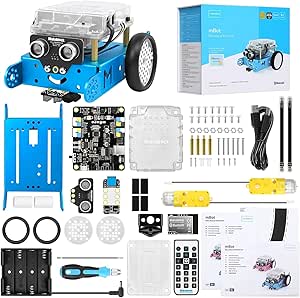
Makeblock mBot Robot Kit, Robotics for Kids Ages 8-12 Learn to Code with Scratch & Arduino, STEM Toys Science Kits for Kids Age 8-12 Boys and Girls Age 8+
This entry-level robot kit stands out for its ease of use, combining simple assembly with versatile programming options like Scratch and Arduino. Compared with the Dash Robot, the mBot offers more hardware customization through its open-source platform, making it ideal for kids eager to explore electronics in depth. The rich tutorials and multi-function capabilities—such as obstacle avoidance and line-following—translate into tangible learning outcomes, although the setup is slightly more involved than plug-and-play models. Its compatibility with over 500 parts and add-on packs makes it a flexible choice for sustained engagement. The main tradeoff is that it requires some basic batteries and assembly, which might be a barrier for very young or impatient users. Overall, this pick makes the most sense for parents wanting a comprehensive STEM experience with room to grow.
Pros:- Easy to assemble with clear instructions, suitable for beginners
- Compatible with Scratch, Arduino, and over 500 parts for customization
- Rich tutorials and interactive apps promote active learning
Cons:- Requires batteries and some assembly, which might be challenging for younger kids
- Limited out-of-the-box coding visibility; coding environment is more complex than plug-and-play options
Best for: Families seeking a well-rounded, expandable introduction to robotics and coding for kids 8-12 who enjoy hands-on projects.
Not ideal for: Parents of very young children (under 8) or those seeking an ultra-simple, ready-to-go toy without assembly or electronics familiarity, as the setup takes about 15 minutes and involves batteries.
- Age Range:8+
- Included Components:Robot Kit, App software, coding cards
- Assembly Required:Yes
- Batteries Required:4 AA (not included)
- Material Type:Metal, Plastic
- Size:6.69 x 3.54 x 7.87 inches
Bottom line: This kit is ideal for parents wanting a versatile, expandable robotic learning experience for kids 8-12 with some initial setup effort.
Apitor Robot Panda Coding Robot Activity Set – 48 Pieces, Screen-Free STEM Learning Toy with Smart Sensing & Loops, Educational Programming Gift for Kids Ages 4-5
This screen-free coding set makes programming accessible through physical buttons, perfect for children aged 4-5 who are just starting to understand sequencing and cause-effect logic. Unlike Dash or Dash’s app-based programming, the Panda’s tactile coding cards and activity puzzles foster hands-on learning without screens, which is ideal for parents wanting to minimize screen time early on. Its smart sensing and obstacle avoidance introduce basic robotics concepts in a simple, engaging way, but the limited complexity and small size mean it’s best for the youngest children or absolute beginners. The set is straightforward to start with, requiring no assembly, but lacks the depth for older kids or those seeking more advanced coding features. Overall, this makes a perfect first step into STEM for preschoolers or early learners.
Pros:- No screen or app needed, ideal for minimal screen time
- Includes comprehensive set of coding and activity cards for guided learning
- Smart sensing and obstacle avoidance build foundational robotics understanding
Cons:- Limited programming complexity; not suitable for older or more advanced learners
- Small size may be less durable or engaging for active play
Best for: Parents of children aged 4-5 looking for a simple, screen-free introduction to coding and robotics with immediate playability.
Not ideal for: Parents of kids over 6 who want more complex programming or those seeking a robot with app integration and advanced features, as the Panda’s capabilities are limited and straightforward.
- Age Range:4-5
- Included Components:Robot Panda, coding cards, activity cards, forest map
- Assembly Required:No
- Batteries Required:3 AA (not included)
- Material Type:Plastic
- Size:5 x 4.3 x 2.4 inches
Bottom line: This set is perfect for introducing very young children to coding concepts in a tactile, screen-free way, with simple but effective robotics features.
Wonder Workshop Dash Robot – Coding Robots for Kids 6+ – Voice Activated STEM Robot Toys – Interactive, Educational & Programmable
This award-winning robot excels in voice activation, dance, obstacle navigation, and app-based programming, making it a well-rounded choice for kids 6 and up. Compared to the simpler Apitor Panda, Dash’s integration with multiple apps—including Blockly and Wonder—offers richer coding opportunities and a more interactive experience, especially appealing to children who enjoy voice commands and app controls. Its robust design, longer battery life (up to 5 hours), and no-assembly setup make it ideal for immediate engagement, but the reliance on app control may limit use in environments with restricted device access. The robot’s extensive features are balanced with a user-friendly app interface, though some parents might find the app-based programming slightly more complex for very young children. Overall, Dash provides an engaging, versatile STEM experience suitable for classroom or home use.
Pros:- Voice activation and obstacle navigation for engaging play
- Multiple compatible apps support coding learning through Blockly and Wonder
- No assembly required, ready to use out of the box
Cons:- Requires a device (tablet or smartphone) for full functionality, limiting screen-free time
- App-based programming can be complex for complete beginners or very young children
Best for: Parents seeking a voice-activated, app-controlled robot for kids 6+ that combines fun with educational coding activities, suitable for varied environments.
Not ideal for: Parents of children under 6 or those preferring screen-free, tactile toys, as Dash relies heavily on app interaction and voice commands, which may be too complex for very young kids.
- Age Range:6+
- Included Components:Dash Robot, USB cable, connectors
- Operation Mode:Voice, app, remote
- Batteries Required:3 AAA (included)
- Size:12.2 x 5.5 x 7.2 inches
- Material Type:Plastic
Bottom line: Dash offers a versatile, voice and app-controlled STEM robot experience ideal for children 6+ who enjoy interactive, educational play with some device dependence.
Dingdongwu Smart Robot Dog – Interactive STEM Pet with Voice Control, 30+ Actions & APP Programming, Durable Design for Kids Age 6+ (Compatible with iOS/Android)
This robot dog combines physical actions like dancing and tricks with voice control and app programming, making it highly engaging for kids 6 and above. Compared to Dash, the Dingdongwu dog emphasizes more lifelike actions and durability, appealing to children who enjoy pet-like interaction and custom actions. Its rechargeable battery and intuitive controls enable hours of active play, and the app allows for designing new routines, fostering creativity and coding skills. The sturdy plastic build ensures it withstands enthusiastic handling, but the size (about 12 inches long) may be less portable for travel or small spaces. Its rich action set and programmability make it a top choice for kids who love pets and robotics combined, although some users may find the app interface slightly less user-friendly than Dash’s.
Pros:- 30+ lifelike actions and voice commands for engaging interaction
- Supports custom programming via app, fostering creativity
- Durable plastic construction for active play
Cons:- Requires a device (smartphone or tablet) for programming and control, adding screen dependency
- Some users report the app interface could be more intuitive for younger kids
Best for: Parents of kids 6+ who want a durable, interactive robot pet with voice control and creative programming features for active and imaginative play.
Not ideal for: Parents seeking a purely screen-free toy or a very compact robot, as the dog’s size and app reliance may limit portability and simplicity for very young children.
- Age Range:6+
- Included Components:Robot dog, remote control, charging cable
- Operation Mode:Voice, app, remote
- Battery Type:3 AAA batteries included
- Size:12.2 x 5.5 x 7.2 inches
- Material Type:Plastic
Bottom line: This robot dog is perfect for active kids 6+ who love pet-like interaction combined with custom coding and durability.
ELEGOO UNO R3 Smart Robot Car Kit V4 for Arduino Robotics for Kids Ages 8-12 12-16 STEM Science Kits Coding Gifts for 8 9 10 11 12 13 14 15 16 Year Old Boys Girls Teens
This comprehensive robot car kit offers a deep dive into electronics, programming, and robotics, making it ideal for older kids and teens already familiar with basic electronics. Unlike the simpler Panda or Dash, the ELEGOO kit includes 24 modules such as obstacle avoidance and line tracing, designed for hands-on assembly and coding from scratch. Its detailed HD instructions and modular design reduce errors during assembly, providing an educational experience that promotes understanding of concepts like sensors, motors, and remote control via phone or tablet. The tradeoff is a steeper learning curve and the need for some prior knowledge in electronics, which might be overwhelming for absolute beginners. Overall, this kit is best suited for those ready to build and code a complex, fully functional robot vehicle.
Pros:- Includes 24 modules for advanced robotics and sensor integration
- HD detailed instructions facilitate learning from scratch
- Control via phone or tablet expands usability
Cons:- Steep learning curve; not suitable for absolute beginners
- Requires prior knowledge of electronics and programming concepts
Best for: Parents of teens or older kids with some electronics experience who want a challenging, educational robotics project that develops programming and engineering skills.
Not ideal for: Parents seeking a simple, plug-and-play robot for younger children or complete beginners, as the assembly and coding require basic technical knowledge and patience.
- Age Range:8-16
- Included Components:24 module parts, remote control, instruction manual
- Assembly Required:Yes
- Batteries Required:Not specified
- Material Type:Plastic, Metal
- Size:Varies by module
Bottom line: This kit is perfect for older kids and teens eager to learn detailed electronics, coding, and robotics with a complex, hands-on build.
Makeblock mBot2 Coding Robot for Kids, Code Learning Support Scratch & Python Programming, Robotics Kit for Kids Ages 8-14 and up, Building STEM Robot Toys Gifts for Boys Girls
This model stands out for its combination of ease of use and expandability, making it a top choice for kids who want to grow into robotics. Compared with the simpler Botley sets, the mBot2 offers more advanced sensors, support for Scratch and Python, and IoT integration, but this also means a steeper learning curve. It’s ideal for slightly older kids or those with some coding background who want a challenge without sacrificing fun. The robot’s modular design and multiple control options (Bluetooth, Wi-Fi, USB) support flexible play and learning environments. Its powerful sensors enable obstacle avoidance, line-following, and color identification, supporting complex projects. However, the setup can be intimidating for absolute beginners, and the price point is higher than basic kits.
Best for tech-savvy kids or classroom settings seeking versatility.Pros:- Supports both Scratch and Python for versatile coding education
- Includes 10+ sensors for obstacle avoidance, line-following, and more
- Expandable with 30+ modules supporting IoT projects
Cons:- Setup can be complex for absolute beginners
- Higher price compared to simpler beginner kits
Best for: Children aged 8-14 who are eager to learn Scratch and Python and want a robot that can expand with their skills.
Not ideal for: Parents or educators looking for a simple, plug-and-play robot suitable for very young children or complete beginners.
- Control Modes:Bluetooth, USB, Wi-Fi
- Sensors:10+ sensors including obstacle avoidance and color detection
- Coding Support:Scratch, Python
- Playtime:Up to 5 hours
- Expandable Modules:30+
- Assembly Required:Yes
Bottom line: This pick is best suited for older kids or educational environments wanting a powerful, expandable robotics platform.
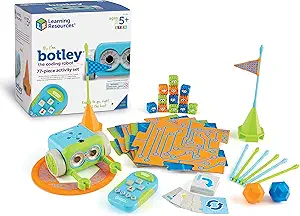
Learning Resources Botley The Coding Robot Activity Set – 77 Pieces, Ages 5+, Screen-Free Coding Robots for Kids, STEM Toys for Kids, Programming for Kids, for Kids
This set makes a strong case as the most accessible and engaging coding robot for younger children. Unlike the more complex Ozobot Evo, Botley is entirely screen-free, relying on a remote control and physical activity set, which promotes active, hands-on learning. It’s ideal for kids aged 5 and up who haven’t yet developed the fine motor skills or reading ability for more advanced robots. The 77-piece activity set encourages creativity, obstacle navigation, and basic programming through simple commands, making coding intuitive and fun. Its ability to detect objects and follow paths introduces core robotics concepts without overwhelming complexity. On the downside, sharing can be difficult, and it offers limited expansion compared to the Ozobot.
Best for preschool and early elementary children new to coding.Pros:- Screen-free, promoting active and hands-on learning
- Includes remote control and 40 coding challenge cards
- Detects objects and can follow black-line paths
Cons:- Limited in complexity and expansion potential
- Sharing among multiple children can be challenging
Best for: Parents of children ages 5-7 looking for a screen-free, easy-to-understand introduction to coding and robotics.
Not ideal for: Older children or those seeking more advanced programming capabilities or digital integration.
- Age Range:5+
- Control Type:Remote control
- Number of Pieces:77
- Sensors:Object detection, line-following
- Power:3 AAA batteries (included)
- Learning Focus:Critical thinking, problem solving
Bottom line: This robot is perfect for young children just starting their coding journey with a simple, engaging physical interface.
Learning Resources Botley the Coding Robot – Code Games for Boys and Girls, Robotics for Kids, STEM Programming, Scientific Building Toys, Engineering Gift Set
Compared to Botley’s basic activity set, this version offers more advanced programming features, making it suitable for kids who are ready to develop their coding skills further. It supports up to 80-step programming, loops, and obstacle detection, providing a more comprehensive introduction to coding logic. Its versatility with detachable arms and a variety of accessories encourages creative problem solving and custom challenge design. It’s an excellent choice for children around age 5 and older who have mastered the basics and want to progress into more complex projects. However, its more advanced features may be confusing for absolute beginners and it requires batteries and some adult setup. The extensive accessories and challenge options make it more engaging but also more costly.
Best for children who want to grow into more sophisticated coding and engineering tasks.Pros:- Supports up to 80 programming steps with loops
- Includes detachable arms and a variety of accessories
- Encourages creative coding and engineering challenges
Cons:- More complex setup and programming may be intimidating for complete beginners
- Costlier due to additional accessories
Best for: Kids aged 5+ who are ready for a deeper, more customizable coding experience and enjoy building and problem solving.
Not ideal for: Parents seeking a simple, straightforward robot for very young children or complete beginners.
- Programming Steps:Up to 80
- Control Type:Remote control
- Accessories:Detachable arms, challenge set
- Batteries:5 AAA (not included)
- Features:Loops, obstacle detection
- Learning Focus:Critical thinking, creativity
Bottom line: Ideal for kids ready to expand their coding skills and enjoy creative, open-ended engineering play.
Ozobot Evo Entry Kit: Interactive STEM Coding Robot for Kids Ages 5+, Screen-Free Learning with Color Code Markers, Blockly Programming, Includes Charging Cable & Protective Case, Educator Approved
This kit makes a compelling choice for educators and parents who want a versatile, scalable coding experience. Unlike Botley, which is purely screen-free, Ozobot Evo combines physical color coding with online Blockly programming, offering a long-term learning pathway from beginner to advanced coder. It supports five skill levels, making it adaptable as children develop their skills. The included lessons are extensive, covering a broad range of STEAM subjects, which exceeds the scope of basic robots. The durable design and portable case make it suitable for classroom use, and the color markers provide a tactile, creative element. The complexity and online component may be overwhelming for very young children or those new to technology.
This is ideal for schools or parents seeking a future-proof, comprehensive coding tool.Pros:- Supports five skill levels from beginner to advanced
- Includes 700+ free lessons across STEAM subjects
- Durable, classroom-ready design with protective case
Cons:- Requires some familiarity with online platforms
- Higher cost due to extensive features and resources
Best for: Children from age 5 to 12 who want a scalable, educational robot that grows with their coding abilities.
Not ideal for: Parents or educators looking for a simple, purely physical robot without screen or online coding components.
- Skill Levels:5
- Coding Methods:Color coding, Blockly
- Included Resources:700+ lessons
- Battery:Rechargeable
- Accessories:Color markers, protective case
- Age Range:5+
Bottom line: Perfect for long-term, progressive coding education, especially in classroom settings or for motivated learners.

How We Picked
These products were evaluated based on several key criteria: ease of use for different age groups, educational value, build quality, versatility in programming options, and overall value for money. We prioritized robots that encourage active learning and creativity while remaining accessible for beginners. Cost was also a factor, but higher-priced options were only ranked higher if they demonstrated significantly enhanced features or durability. The ranking reflects a balance between affordability and advanced features, aiming to serve a broad range of learners from early beginners to more experienced young coders.Factors to Consider When Choosing Best Coding Robot For Kids
Choosing the right coding robot for your child depends on several important factors. It’s crucial to match the robot’s complexity with your child’s age and experience, ensuring they are neither overwhelmed nor under-stimulated. Additionally, consider the programming platforms supported, as compatibility with popular tools like Scratch or Python can extend learning beyond the robot itself. Durability and ease of assembly are often overlooked but significantly impact ongoing engagement. Price and expandability also play roles—more expensive kits tend to offer more features but may not be necessary for beginners. Finally, think about whether you prefer screen-free options for early learners or more advanced kits for children ready to code more independently.Age and Skill Level
Matching the robot’s complexity with your child’s age and coding experience is essential. For younger children or absolute beginners, simple, screen-free robots like Botley or Apitor’s Panda are ideal. As kids grow more confident, they may benefit from kits that support more advanced programming languages like Scratch or Python, such as the Makeblock mBot2. Choosing age-appropriate options prevents frustration and keeps the learning process fun and engaging.Programming Platforms
Consider whether the robot supports platforms your child can easily learn and grow with. Visual programming tools like Scratch are beginner-friendly and widely used in education, making them a strong foundation. For older or more advanced kids, support for text-based languages like Python can open doors to more complex projects. Compatibility with multiple platforms also allows for a smoother transition as your child’s skills develop.Durability and Build Quality
Kids can be rough with their toys, so durability matters. Robots made with sturdy materials and simple assembly tend to last longer and require less maintenance. Look for kits with clear instructions and modular parts that can be easily repaired or expanded. Investing in a well-built robot can save money over time and ensure sustained interest in STEM activities.Price and Expandability
While budget constraints are real, investing a bit more in a versatile robot can provide greater long-term value. Robots that support additional modules, sensors, or programming languages can grow with your child’s skills. Conversely, very inexpensive options might be suitable for very young children or as an introduction but may quickly become limiting.Learning Focus and Future Growth
Identify whether your goal is to introduce basic coding concepts or to develop more advanced programming skills. Some robots are better suited to exploratory play, while others serve as foundational tools for developing coding fluency. Picking a robot that aligns with your child’s current level and future interests helps sustain motivation and ensures meaningful educational progress.Frequently Asked Questions
What is the best coding robot for a beginner who is 5 years old?
For a 5-year-old just starting out, robots like Botley the Coding Robot or Apitor Panda are ideal because they focus on screen-free, tactile learning. These robots teach fundamental programming concepts through hands-on activities without overwhelming the child with complex interfaces. Their simple design and engaging play patterns make learning to code feel like a game, fostering early interest in STEM. As children develop confidence, they can transition to more advanced options supporting visual or text-based coding.Should I buy a more expensive robot to ensure better learning?
Spending more can provide additional features, durability, and future expandability, but it’s not always necessary for effective learning. For absolute beginners or younger kids, simpler and less costly robots often suffice, providing a solid foundation without frustration. More expensive kits tend to include more sophisticated programming options and modular components that grow with your child’s skills. Consider your child’s age, interest level, and your educational goals when deciding how much to invest.Are screen-free robots still relevant for modern coding education?
Absolutely. Screen-free robots like Botley or Apitor Panda are excellent at building foundational skills, especially for early learners or those sensitive to screen time. They emphasize problem-solving, sequencing, and logical thinking through tactile play, which can translate well into digital coding later. While screen-based robots offer more advanced programming possibilities, starting with screen-free options helps develop core cognitive skills before moving to more complex platforms.What features should I prioritize for an older child interested in coding?
For older children, look for robots that support more advanced programming languages like Python or support integration with platforms like Arduino. These features allow for deeper exploration of coding concepts and project customization. Robots that are expandable with sensors and modules also offer ongoing challenge and engagement. Prioritizing versatility and compatibility with popular coding environments helps ensure the robot remains a valuable learning tool as skills advance.How important is the robot’s physical durability for long-term use?
Durability is vital if your child is enthusiastic and likely to use the robot frequently. Well-constructed robots made from sturdy materials minimize breakage and maintenance costs, ensuring sustained engagement over time. Easy-to-assemble kits with modular parts facilitate repairs and upgrades, extending the product’s lifespan. Investing in a durable robot ultimately provides better value and keeps the focus on learning rather than constant repairs.Conclusion
For parents seeking a comprehensive, easy-to-use robot that grows with their child, the Makeblock mBot2 offers outstanding value and versatility. If budget is a concern, the Botley the Coding Robot provides excellent early learning with minimal screen time. For those looking to introduce younger kids to coding through tactile play, the Apitor Panda is ideal. The Wonder Workshop Dash Robot balances fun and education, making it perfect for children aged 6 and up. For more advanced learners or those interested in engineering projects, the ELEGOO UNO Robot Car supports deeper exploration into robotics and programming. Each option serves different needs, so consider your child’s age, experience, and your educational goals when choosing the best coding robot.Halloween Picks
halloween
As an affiliate, we earn on qualifying purchases.