The Amazon Fire HD 10 Kids Pro is the best children’s educational tablet for most families in 2026, because its 10.1-inch display, age 6–12 software, and two-year worry-free guarantee give it a longer useful life than anything else in this lineup. For parents who want learning to come first and entertainment second, the LeapFrog LeapPad Academy wraps a real curriculum in a closed, ad-free system, while the Amazon Fire 7 Kids is the cheapest entry point that still includes a kid-proof case and a year of curated content. The core tradeoff in this category is closed learning ecosystems versus open app stores: LeapFrog controls everything your child sees, and Amazon gives you more content plus more to manage. Screen size, storage, and subscription costs separate otherwise similar models, so the right pick depends more on your child’s age than on any spec sheet. Below, I break down all eight tablets by who they suit best, what each one gives up, and how I ranked them.

Turn the school run and nap time into listening time
- Thousands of audiobooks, podcasts and originals
- Listen on your phone, tablet or Echo — also offline
- Cancel anytime
Complete the kit


Key Takeaways
- The Amazon Fire HD 10 Kids Pro took the top spot because it’s the only pick here that genuinely covers ages 6 through 12 — the slimmer case, request-based app store, and full HD screen keep it relevant years after smaller kids’ tablets feel babyish.
- Every amazon.com/dp/B0BL5SZ3VV?tag=healthykidplay-20&ascsubtag=dc-351017″ target=”_blank” rel=”nofollow sponsored noopener”>amazon.com/dp/B0CVDPXVWC?tag=healthykidplay-20&ascsubtag=dc-351017″ target=”_blank” rel=”nofollow sponsored noopener”>amazon.com/dp/B0C8C2NZMQ?tag=healthykidplay-20&ascsubtag=dc-351017″ target=”_blank” rel=”nofollow sponsored noopener”>amazon.com/dp/B0BL5C43SL?tag=healthykidplay-20&ascsubtag=dc-351017″ target=”_blank” rel=”nofollow sponsored noopener”>Amazon pick ships with a year of Amazon Kids+ and a two-year worry-free guarantee, so the Fire models dominate on value even before you compare hardware.
- LeapFrog‘s tablets ranked by how focused you want learning to be: the LeapPad Academy beat the older LeapPad Ultimate because its educator-approved app library and kid-safe web access feel current, while the Ultimate is showing its age.
- Storage turned out to be a bigger dividing line than screen size — the 16 GB Fire 7 Kids is fine for streaming but fills fast with downloaded videos, while the 64 GB Fire HD 8 Kids Pro suits older kids with big app libraries.
- The LeapFrog My First Learning Tablet isn’t a tablet at all — it’s a screen-based toy for ages one to three — but it earned a spot because it’s the right answer for parents tempted to hand a toddler a real device.
| Amazon Fire HD 10 Kids Pro Tablet, 10.1″ HD Screen, 32 GB |  | Best Overall | Display: 10.1-inch HD | Storage: 32 GB | Battery Life: Up to 13 hours | VIEW LATEST PRICE | See Our Full Breakdown |
| Amazon Fire 7 Kids Tablet (Newest Model) – 7-inch, 16GB, Blue |  | Best Value Pick | Screen Size: 7 inches | Storage: 16 GB, expandable to 1TB via microSD | Battery Life: Up to 10 hours | VIEW LATEST PRICE | See Our Full Breakdown |
| LeapFrog LeapPad Academy Kids’ Learning Tablet, Green |  | Best for Structured Learning | Screen Size: 7 inches | Age Range: 3-8 years | Battery: Rechargeable lithium-ion | VIEW LATEST PRICE | See Our Full Breakdown |
| Amazon Fire HD 8 Kids Tablet (2024 Release), Disney Princess Edition | 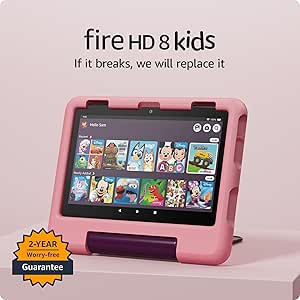 | Best for Preschool Disney Fans | Display: 8-inch HD touchscreen (1280 x 800) | Processor: Hexa-core 2.0 GHz | RAM: 3 GB | VIEW LATEST PRICE | See Our Full Breakdown |
| LeapFrog My First Learning Tablet, Violet |  | Best for Toddlers | Age Range: 12 months and up | Power: 3 AAA batteries (demo batteries included) | Activities: 20 interactive app icons | VIEW LATEST PRICE | See Our Full Breakdown |
| Amazon Fire HD 10 Kids Tablet (10.1″ HD, 32 GB, Blue) |  | Best Overall for Young Learners | Display: 10.1-inch HD | Storage: 32 GB (expandable up to 1 TB, sold separately) | RAM: 3 GB | VIEW LATEST PRICE | See Our Full Breakdown |
| LeapFrog LeapPad Ultimate Ready for School Tablet, Green |  | Best for School Readiness | Screen: 7-inch shatter-safe display | Age Range: 3-6 years | Preloaded Content Value: $195+ | VIEW LATEST PRICE | See Our Full Breakdown |
| Amazon Fire HD 8 Kids Pro Tablet (8″ HD, 64 GB, Hello Teal) |  | Best for Older Kids (Ages 6-12) | Display: 8-inch HD | Storage: 64 GB (expandable up to 1 TB, sold separately) | RAM: Up to 4 GB | VIEW LATEST PRICE | See Our Full Breakdown |
| children’s educational tablet | Age Range | Storage | Battery Life | Display |
|---|---|---|---|---|
| Amazon Fire HD 10 Kids Pro Tab | 6-12 years | 32 GB | Up to 13 hours | 10.1-inch HD |
| Amazon Fire 7 Kids Tablet | 3-7 years | 16 GB, expandable to 1TB via microSD | Up to 10 hours | — |
| LeapFrog LeapPad Academy Kids’ | 3-8 years | — | — | — |
| Amazon Fire HD 8 Kids Tablet | 3-7 years | 32 GB (25 GB usable), expandable to 1TB | Up to 13 hours | 8-inch HD touchscreen (1280 x 800) |
| LeapFrog My First Learning Tab | 12 months and up | — | — | — |
| Amazon Fire HD 10 Kids Tablet | 3-7 years | 32 GB (expandable up to 1 TB, sold separately) | 13 hours | 10.1-inch HD |
| LeapFrog LeapPad Ultimate Read | 3-6 years | — | — | — |
| Amazon Fire HD 8 Kids Pro Tabl | 6-12 years | 64 GB (expandable up to 1 TB, sold separately) | Up to 13 hours | 8-inch HD |
More Details on Our Top Picks
Amazon Fire HD 10 Kids Pro Tablet, 10.1″ HD Screen, 32 GB
The Amazon Fire HD 10 Kids Pro earns the top spot because it covers the widest ground. The 10.1-inch HD display is the largest in this lineup, the 6-12 age range outlasts both the Fire 7 Kids and the Fire HD 8 Kids (each capped at age 7), and 13 hours of battery means it survives a school day plus homework. Compared with the LeapPad Academy, this is a real tablet — kids can read, stream, and create — while parents still get granular controls through the Amazon Kids dashboard. A year of Kids+ and a two-year worry-free guarantee soften the higher price. The compromises are real: 32 GB fills quickly with downloaded video, the Pro’s slimmer case is less rugged than the standard Fire HD 10 Kids edition, and Kids+ auto-renews after year one. For most families, though, this is the longest-lived buy.
Pros:- Largest, sharpest screen in the roundup at 10.1 inches
- Age 6-12 target means years of use before it’s outgrown
- Two-year worry-free guarantee covers drops and spills
- Detailed parental controls via the Amazon Kids dashboard
Cons:- 32 GB storage fills fast with downloaded shows and games
- Amazon Kids+ auto-renews at full price after the first year
- Slimmer Pro case offers less drop protection than the standard Kids model
Best for: Families with kids aged 6-12 who want one tablet to carry a child through elementary school
Not ideal for: Toddlers and preschoolers — it’s large and heavy for small hands, and the Pro case is less rugged than the standard Kids edition
- Display:10.1-inch HD
- Storage:32 GB
- Battery Life:Up to 13 hours
- Age Range:6-12 years
- Included Content:1 year of Amazon Kids+
- Case:Kid-proof case with stand/handle
- Warranty:2-year worry-free guarantee
Our verdict“If you’re buying one tablet to last a grade-schooler for years, this is the pick.”
Amazon Fire 7 Kids Tablet (Newest Model) – 7-inch, 16GB, Blue
The Amazon Fire 7 Kids is the cheapest way into a real tablet in this roundup, and the value math is strong: a kid-proof case, up to 10 hours of battery, and six months of Amazon Kids+ all come in the box. I’d point parents of three-to-five-year-olds here over the Fire HD 8 Kids — the smaller, lighter body fits little hands, and at this age the HD 8’s sharper screen and extra RAM matter less than sheer survivability. Against the LeapPad Academy at similar money, you get a far bigger content library, though far less pedagogical structure. The catches are honest ones: 16 GB of storage is tight even with microSD expansion up to 1TB, the Kids+ subscription auto-renews at $5.99 a month after six months, and the 3-7 target means an eight-year-old will find it limiting.
Pros:- Lowest price in the lineup with a kid-proof case included
- Small, light body suits young children’s hands
- Expandable storage up to 1TB via microSD
- Six months of ad-free Amazon Kids+ content included
Cons:- Only 16 GB of internal storage
- Kids+ auto-renews at $5.99/month after six months
- Age 3-7 ceiling means older siblings will outgrow it quickly
Best for: Budget-minded parents of 3-5 year olds buying a first real tablet for shows, books, and simple games
Not ideal for: Kids near the top of the 3-7 range or heavy offline video watchers — 16 GB of storage fills fast
- Screen Size:7 inches
- Storage:16 GB, expandable to 1TB via microSD
- Battery Life:Up to 10 hours
- Age Range:3-7 years
- Color:Blue
- Included:Kid-proof case and 6 months of Amazon Kids+
- Subscription Renewal:$5.99/month after trial
Our verdict“The sensible first tablet for a preschooler when price matters more than screen quality or storage.”
LeapFrog LeapPad Academy Kids’ Learning Tablet, Green
The LeapFrog LeapPad Academy takes a different path from the Amazon tablets in this roundup: instead of an open app store, it runs a closed, educator-built library covering math, reading, writing, and coding. I see that as its real selling point — a child who picks it up lands in a lesson, not a video feed. The included stylus and shatter-safe screen with a tough bumper suit the 3-8 age band better than the glass-heavier Fire HD 8 Kids, and there’s no subscription renewal hanging over the core experience the way Amazon Kids+ does after year one. The tradeoff is ceiling and cost: the ecosystem means extra games cost extra money, and by age seven or eight a confident reader will outgrow it faster than they would a Fire HD 10 Kids Pro. Choose this for learning first, entertainment second.
Pros:- Educator-built curriculum across math, reading, writing, and coding
- Shatter-safe screen and tough bumper built for rough handling
- Included stylus supports early writing practice
- No required ongoing subscription for core content
Cons:- Additional games and content sold separately
- Hard age ceiling around 8, shorter lifespan than the Fire tablets
- Far less entertainment content than any Amazon option here
Best for: Parents of 3-6 year olds who want a closed, curriculum-first device with no app-store distractions or ads
Not ideal for: Kids over 7 or confident readers — the content tops out around age eight and add-on games raise the total cost
- Screen Size:7 inches
- Age Range:3-8 years
- Battery:Rechargeable lithium-ion
- Included Accessories:Stylus and tough bumper with kickstand
- Web Access:Kid-friendly curated web content
- Trial Content:3-month LeapFrog Academy trial
- Skills Covered:Math, reading, writing, coding, problem-solving
Our verdict“The right choice when you want a learning device that happens to be a tablet, not the other way around.”
Amazon Fire HD 8 Kids Tablet (2024 Release), Disney Princess Edition
Between the budget Fire 7 Kids and the larger Fire HD 10 Kids Pro sits the Fire HD 8 Kids, and this Disney Princess edition makes the middle ground feel deliberate rather than a compromise. The 8-inch HD screen is visibly sharper and roomier than the Fire 7’s, which matters for early readers tracing words on a page, and the hexa-core chip with 3 GB of RAM keeps Disney, Nickelodeon, and PBS Kids apps running smoothly. I rate it above the LeapPad Academy for sheer content breadth, though LeapFrog’s curriculum is tighter. The themed case is the hook — some children simply use a device more when it feels like theirs. The downsides: Kids+ renews automatically after the first year, only about 25 GB of the 32 GB storage is actually usable, and the Princess styling may wear thin if tastes change.
Pros:- Sharper 8-inch HD display with 3 GB of RAM for smooth apps
- Full year of ad-free Amazon Kids+ included
- Themed Kid-Proof Case with stand and handle
- Expandable storage up to 1TB via microSD
Cons:- Only about 25 GB of the 32 GB storage is usable
- Kids+ subscription auto-renews after year one
- Character styling can age poorly as kids’ tastes shift
Best for: Disney-loving preschoolers and early readers aged 3-6 who will engage more with a device that feels personal
Not ideal for: Older grade-schoolers — the 3-7 content ceiling and princess theme will feel babyish by second grade
- Display:8-inch HD touchscreen (1280 x 800)
- Processor:Hexa-core 2.0 GHz
- RAM:3 GB
- Storage:32 GB (25 GB usable), expandable to 1TB
- Battery Life:Up to 13 hours
- Cameras:2 MP front, 5 MP rear with 1080p video
- Ports:USB-C, microSD slot, 3.5mm audio jack
- Age Range:3-7 years
- Included:Kid-Proof Case and 1 year of Amazon Kids+
Our verdict“The sweet spot for a young Disney fan who needs a real tablet with room to grow past the Fire 7.”
LeapFrog My First Learning Tablet, Violet
Strictly speaking, the LeapFrog My First Learning Tablet isn’t a tablet at all — it’s a tough plastic toy with 20 light-up app icons that teach letters, numbers, shapes, and animal sounds to children from 12 months up. That’s exactly why it belongs on this list. For a two-year-old, handing over a Fire 7 Kids invites cracked screens and accidental purchases; this can be thrown across a room and costs a fraction of the price. There are no ads, no Wi-Fi, and no subscriptions — a stark contrast with every Amazon option here. Parents get Explore, Learn, and Music modes plus multilingual greetings for variety. The limits are real, though: it runs on three AAA batteries, and the content plateaus quickly, so most kids will be ready for a LeapPad Academy or a Fire tablet by age three.
Pros:- Completely offline — no ads, purchases, or connectivity risks
- Tough enough to survive being dropped and thrown
- Three play modes plus multilingual greetings keep it varied
- Very low price compared with any real tablet
Cons:- Runs on three AAA batteries that need regular replacement
- Content is outgrown quickly, usually by age three
- No actual screen or expandable content
Best for: Toddlers 12 months to 3 years whose parents want early learning without Wi-Fi, ads, or subscription fees
Not ideal for: Kids three and up — the activities plateau fast and there’s no real screen, apps, or video content
- Age Range:12 months and up
- Power:3 AAA batteries (demo batteries included)
- Activities:20 interactive app icons
- Modes:Explore, Learn, and Music
- Skills Covered:Letters, numbers, shapes, animals, colors
- Audio & Feedback:Interactive lights, sounds, multilingual greetings
Our verdict“The right ‘first tablet’ for a toddler — buy this now and a real tablet later.”
Amazon Fire HD 10 Kids Tablet (10.1″ HD, 32 GB, Blue)
For most families shopping this list, the Amazon Fire HD 10 Kids is the one I’d start with. The 10.1-inch HD screen is the largest here, and that size matters more than it sounds: picture books stay legible, math apps have room to breathe, and two siblings can watch together without squinting. Compared with the LeapFrog LeapPad Ultimate, this is a real tablet rather than a closed learning device, so it keeps pace as picture books turn into chapter books and cartoons turn into coding apps. The 13-hour battery and granular parental controls round out a package that travels well. The tradeoffs are mostly financial. The bundled year of Amazon Kids+ renews as a paid monthly subscription, the 32 GB of storage fills fast once videos are downloaded, and it costs more than the smaller Fire HD 8 Kids models. Still, no rival here balances screen size, content depth, and safeguards this well for its target age range.
Pros:- Largest screen in the roundup at 10.1 inches — easier for reading apps and shared viewing
- 13-hour battery survives long car trips without a charger
- Includes a year of Amazon Kids+ and a kid-proof case in the box
- Granular parental controls for screen time, content filters, and age settings
Cons:- Kids+ converts to a paid monthly subscription after the first year
- 32 GB of storage fills quickly once videos are downloaded offline
- Costs more than the smaller Fire HD 8 Kids and Fire 7 Kids models
Best for: Families with kids ages 3-7 who want one tablet that handles books, videos, and learning apps on a big, sharable screen
Not ideal for: Parents unwilling to pay for Amazon Kids+ after year one, or kids over 8 who’d prefer the less childish look of the Pro models
- Display:10.1-inch HD
- Storage:32 GB (expandable up to 1 TB, sold separately)
- RAM:3 GB
- Battery Life:13 hours
- Age Range:3-7 years
- Included:1-year Amazon Kids+ subscription and kid-proof case
- Generation:11th
- Color:Blue
Our verdict“The default choice for ages 3-7, offering the biggest screen and the strongest all-around balance of content, controls, and battery life.”
LeapFrog LeapPad Ultimate Ready for School Tablet, Green
The LeapFrog LeapPad Ultimate plays a different game than the Fire tablets in this roundup, and I rank it as the pick for parents who want learning first and entertainment second. Every app is built around school readiness, with more than $195 of educational content preloaded, so there’s no subscription meter running the way there is with the Amazon Fire HD 10 Kids once its free year ends. The shatter-safe screen and built-in bumper also shrug off drops that would worry me on a standard slate. The catch: this is a 2019 device, and it shows. The 7-inch display is dimmer and lower-resolution than any Fire here, the kid-safe browser reaches only pre-selected websites, and most children age out of the content around six or seven. Compared with the LeapFrog LeapPad Academy, it leans harder into preschool prep than general play. For a focused runway into kindergarten, nothing else on this list is as purpose-built.
Pros:- Over $195 of preloaded educational content with no subscription required
- Shatter-safe screen and built-in bumper handle real drops
- Curriculum is purpose-built for school readiness rather than general entertainment
- Adaptive learning technology adjusts difficulty as skills grow
Cons:- Dated 2019 hardware with a dimmer, lower-resolution display than the Fire tablets
- Web browsing is limited to pre-selected, kid-approved sites
- Most children outgrow the content by age six or seven
Best for: Parents of 3-to-6-year-olds who want structured school-readiness learning with zero ongoing subscription fees
Not ideal for: Kids past first grade — the dated hardware, low-resolution screen, and preschool-focused content won’t hold their interest
- Screen:7-inch shatter-safe display
- Age Range:3-6 years
- Preloaded Content Value:$195+
- School Readiness Apps:$100 worth included
- Durability:Shatter-safe screen with built-in bumper
- Web Access:Kid-friendly browser with pre-selected sites
- Parental Controls:Yes
- Model Year:2019 (1st Generation)
Our verdict“Buy it for a 3-to-6-year-old whose learning you want structured and subscription-free — just know they’ll outgrow it within a few years.”
Amazon Fire HD 8 Kids Pro Tablet (8″ HD, 64 GB, Hello Teal)
Where the Fire HD 10 Kids skews toward the preschool crowd, the Amazon Fire HD 8 Kids Pro is built for the 6-to-12 range, and the differences go beyond marketing. The slim case looks like grown-up tech rather than a chunky toy, kids can request apps from a digital store while parents keep approval rights, and 64 GB of storage doubles what the standard Fire HD 10 Kids ships with. Against the Fire HD 10 Kids Pro, this 8-inch model delivers the same Pro software and 13-hour battery in a cheaper, more backpack-friendly body. The compromises: the smaller screen is less comfortable for long reading sessions, you’re still inside Amazon’s ecosystem with no Google Play store, and calls or browsing need Wi-Fi. Compared with the LeapFrog LeapPad Ultimate, it trades that device’s curated preschool curriculum for open-ended content an older kid can grow into. For grade-schoolers who’ve outgrown the toy aesthetic, this is the smart middle step.
Pros:- 64 GB of storage — double the Fire HD 10 Kids — plus expansion up to 1 TB
- Slim, grown-up case design that older kids won’t find embarrassing
- Digital store lets kids request apps while parents approve or deny each one
- 13-hour battery and up to 4 GB of RAM for smoother multitasking
Cons:- Locked to Amazon’s app ecosystem — no Google Play store
- Calls and browsing require Wi-Fi; there’s no cellular option
- Amazon Kids+ renews at a monthly cost after the included year
Best for: Grade-schoolers ages 6-12 who want a tablet that looks grown-up while parents retain app approval and activity monitoring
Not ideal for: Preschoolers — the slimmer case offers less drop protection than the chunky bumpers on the standard Kids models, and the Pro content skews older
- Display:8-inch HD
- Storage:64 GB (expandable up to 1 TB, sold separately)
- RAM:Up to 4 GB
- Battery Life:Up to 13 hours
- Age Range:6-12 years
- Included Subscription:1-year Amazon Kids+
- Case:Slim kid-friendly case, Hello Teal
- Connectivity:Wi-Fi only
Our verdict“The right call for ages 6-12, pairing a grown-up look with real parental oversight and double the storage of its 10-inch sibling.”

How We Picked
I ranked these tablets on the factors that decide whether a kids’ tablet gets used for years or abandoned in months: age fit, the quality and cost of educational content, the depth of parental controls, durability and warranty coverage, and the hardware basics — screen quality, battery life, storage, and speed. A tablet that matches a child’s age band and grows with them scores higher than one with better specs aimed at the wrong stage, which is why the Pro editions outrank their standard siblings for school-age kids.
Content and cost carried the most weight after age fit. I looked at what each ecosystem actually includes — Amazon Kids+ versus the LeapFrog App Center — and what a family pays over two years once subscriptions renew or apps are bought one by one. Durability mattered in proportion to how likely a tablet is to be dropped, so included cases and replacement policies counted for more than processor benchmarks. Tablets that serve a narrow niche, like the toddler-focused LeapFrog My First Learning Tablet, were judged on how well they fill that niche rather than against full-featured slates.
Factors to Consider When Choosing Children’s Educational Tablets
The product reviews above tell you which tablets came out on top; this section covers how to think about the purchase itself. Most parents shop this category by screen size and price, but the decisions that actually shape how long a tablet lasts are about ecosystems, subscriptions, and age bands. Here’s what I’d weigh before spending anything.
Closed Learning Systems vs. Open Tablets
The biggest fork in this category is between LeapFrog’s closed system and Amazon’s open one. A LeapFrog tablet runs only what LeapFrog approves — no YouTube, no ads, no surprise purchases — which makes it nearly impossible for a child to stumble into something you didn’t choose. The tradeoff is a smaller, pricier app library that your child will outgrow by around age eight. Amazon’s Fire Kids tablets work more like regular tablets with training wheels: thousands of apps, books, and videos through Amazon Kids+, plus a filtered browser and an app store you’ll need to supervise more actively. Families who want a device purely for phonics, math, and early reading tend to be happier with LeapFrog. Families who want one device for homework apps, audiobooks, and long car rides get more from a Fire. The common mistake is buying the open system for a child who just wants to press one button and learn — or the closed system for a nine-year-old who’ll find it limiting within a month.
Match the Tablet to Your Child’s Age Band, Not Your Budget
Every tablet in this roundup targets one of three bands: toddlers (one to three), early learners (three to seven), and school-age kids (six to twelve). Toy-style devices like the LeapFrog My First Learning Tablet exist because real tablets are heavy, fragile, and overwhelming for a two-year-old — a toddler needs chunky buttons and cause-and-effect games, not a touchscreen. The standard Kids editions and LeapFrog’s LeapPads cover the middle band, where parental controls do most of the work and content skews toward letters, numbers, and early logic. Pro editions aim at the oldest band with a more grown-up interface, a slimmer case, and features like a request-based store that teaches kids to ask before downloading. Buying up for room to grow sounds sensible but usually backfires: a four-year-old handed a Pro will ignore the interface, and a ten-year-old handed a LeapPad will abandon it. If your child sits near a boundary, size the tablet to the age they’ll be for most of the next two years. Sharing between siblings works better than stretching one device across a five-year age gap.
Price the Content, Not Just the Hardware
The sticker price on a kids’ tablet is only part of what you’ll spend. Every Fire Kids tablet includes a year of Amazon Kids+, after which the subscription renews monthly unless you cancel — so a Fire that costs $50 less than a rival can end up costing more by year two. LeapFrog flips the model: no subscription, but apps and cartridges are bought individually, and building a decent library adds up quickly. Before comparing prices, estimate your two-year cost for each option, including the subscription you expect to keep or the apps you’d realistically buy. Also check what happens when you stop paying: a Fire tablet still works without Kids+, but most of the included content library goes away. The families who feel burned by this category are usually the ones who compared hardware prices and ignored the content bill.
Durability and Replacement Policies Beat Raw Specs
Kids drop tablets, step on them, and spill on them, so build quality and warranty coverage matter more here than in any other gadget category. Amazon’s included kid-proof cases and two-year worry-free guarantee — which replaces a broken tablet, no questions asked — set the standard every rival is measured against. LeapFrog builds its bumpers and shatter-safe screens into the device itself, which is why LeapPads survive toddlerhood so well. The frequent mistake is buying a regular adult tablet plus a third-party case to save money: you lose the replacement policy, the kid-specific software, and usually the savings once the first screen cracks. When comparing two models, weight the case quality and warranty terms as heavily as the processor or camera. A slightly slower tablet that survives two years of drops is the better purchase every time.
Storage and Screen Size: Where the Spec Sheet Actually Matters
Most specs on a kids’ tablet barely affect daily use, but storage and screen size genuinely change the experience. A 16 GB tablet works if your child streams everything, yet a single season of downloaded shows can eat most of that space — a problem you’ll hit the night before a flight. 32 GB is the comfortable floor for mixed use, and 64 GB makes sense for older kids with large games and school apps. Screen size is a comfort tradeoff, not a quality one: a seven- or eight-inch tablet is lighter and easier for small hands to hold, while a ten-inch screen is better for reading, video, and two kids watching together. If the tablet will travel, check for a headphone jack and offline download support before you buy. Everything else on the spec sheet — camera megapixels, processor model — should break ties, not drive the decision.
Parental Controls Are the Real Product
You’re not really buying a tablet; you’re buying a control system with a screen attached. Look for time limits by activity type — the ability to allow unlimited reading but cap games and video is the single most useful feature in this category. Content filters should work by age band and be adjustable per child, since a household with a five-year-old and a nine-year-old needs two different rule sets on one device. Web access deserves special attention: some tablets offer no browser at all, some a whitelist of approved sites, and some a filtered open web, and those are very different risk levels. Amazon’s Pro editions add a digital store where kids request purchases and you approve them, which turns buying apps into a teaching moment instead of a fight. Set everything up on day one, because loosening rules later is far easier than tightening them.
Frequently Asked Questions
Should I choose a LeapFrog or an Amazon Fire Kids tablet for a five-year-old?
For most five-year-olds, either works, and the choice comes down to what you want the tablet to be. The LeapPad Academy is the pick if you want a device that only does learning: its apps are built around reading, math, and problem-solving progressions, and there’s no browser, no ads, and nothing to accidentally buy. The Fire HD 8 Kids is the pick if you want variety — it plays videos, reads audiobooks, and runs a far larger app library through Amazon Kids+. LeapFrog’s library is smaller and costs more per app, but everything in it has a learning goal. If your child will use the tablet mostly on weekends and trips, the Fire’s flexibility wins; if it’s a daily learning tool, LeapFrog’s focus pays off.
What happens when the included year of Amazon Kids+ runs out?
The tablet keeps working, but the bulk of the content library disappears until you resubscribe. Kids+ renews automatically at the going monthly rate unless you cancel before the year ends, so set a reminder around month eleven. Without it, you keep any apps you’ve bought outright, the parent dashboard, and some free content, but the thousands of included books, shows, and games that made the tablet feel full are locked again. Many families keep the subscription during the heavy-use years and cancel once their child moves to school-provided devices. Either way, build the renewal price into your cost comparison from the start rather than treating it as a surprise.
What’s the difference between the Fire HD 8 Kids and the Fire HD 8 Kids Pro?
The hardware is nearly identical — same screen, same internals — and the differences are aimed at age. The standard Kids edition wraps the tablet in a chunky foam-style case and a cartoon-forward interface built for ages three to seven, with everything locked behind the parent’s choices. The Pro edition uses a slimmer case, a more grown-up home screen, and adds a digital store where kids can request apps and books for you to approve. Amazon targets the Pro at ages six to twelve, and the request system is the standout feature because it gives older kids independence without open spending. If your child is five or younger, save the money and get the standard edition; at seven or eight, the Pro is worth the difference.
Is 16 GB of storage enough on a kids’ tablet?
It’s enough for a younger child who mostly streams content and runs a handful of small apps, which is why the Fire 7 Kids can sell at its price. The trouble starts with downloads: a few saved movies for a road trip can consume most of 16 GB, and system files already take a share before you add anything. Fire tablets accept microSD cards, which softens the limit cheaply, though apps don’t always move to the card cleanly. If your budget allows, 32 GB is the safer default, and 64 GB suits school-age kids with big games and schoolwork apps. Buy for how you’ll use the tablet in a year, not on day one.
Are kids’ educational tablets actually educational, or just entertainment devices?
Honestly, they’re whichever you set them up to be. A Fire tablet handed over with no rules is a video player, and a LeapFrog used without guidance is an expensive toy. The learning value comes from the content choices and limits you configure: time limits that favor reading, apps matched to what your child is working on, and goals like finishing a book before games become available. LeapFrog builds skill progression into its apps by design, while Amazon gives you the raw material and the dashboard to shape it. Research on kids and screens keeps pointing to the same finding — content quality and parental involvement matter far more than the device itself. Treat the tablet as a tool you manage, not a tutor you hire, and any pick on this list can earn its place.
Conclusion
After weighing all eight tablets by buyer rather than by spec, here’s where I’d land. For most families, the Amazon Fire HD 10 Kids Pro is the best overall pick — the big screen, ages six-to-twelve software, and two-year guarantee make it the longest-lasting single purchase in this lineup. If you want the best value, the Amazon Fire 7 Kids delivers the same case, warranty, and Kids+ year at the lowest price, accepting a smaller screen and less storage. Parents who want learning first, entertainment second should choose the LeapFrog LeapPad Academy, the strongest closed-curriculum option here. For beginners and preschoolers, the LeapPad Ultimate Ready for School or the standard Fire HD 8 Kids fit ages three to seven without the complexity older kids want. And for specific needs: the Fire HD 10 Kids is the big-screen pick for young siblings who share, the Fire HD 8 Kids Pro is the budget-friendly route for a tween, the Disney Princess Fire HD 8 Kids turns the gift itself into part of the appeal, and the LeapFrog My First Learning Tablet is the right call for a toddler who’s too young for any real tablet. Pick the row that matches your child’s next two years, and you’ll buy once.
Halloween Picks
halloween
As an affiliate, we earn on qualifying purchases.